

Power BI is a strong choice for interactive dashboards and data analysis, but reporting requirements are not always about dashboards. Some businesses need highly formatted reports, precise layouts, embedded reporting within applications, or the ability to generate the same report in multiple formats. When those requirements become a bigger part of day-to-day reporting, it may be time to reconsider the reporting setup.
This is where Power BI to Jasper Migration can make sense. Jasper Reports offers a different approach to report development, giving organizations greater control over report structure, formatting, customization, and integration. But the move comes with important questions: What should be migrated? What needs to be redesigned? How should existing calculations and data sources be handled?
Understanding these factors can help organizations decide whether Jasper Reports is the right fit and plan the transition without disrupting essential reporting operations.
Why Consider Power BI to Jasper Migration?
Power BI and Jasper Reports serve different reporting requirements. Power BI is particularly effective for interactive analytics and visual dashboards, while Jasper Reports is well suited to structured, highly formatted, and application-based reporting.
Organizations may choose to Migrate power BI to jasper reports when they need:
• Greater control over report layouts and formatting
• Pixel-perfect business and operational reports
• Application-embedded reporting
• Customized report templates
• Parameter-driven report generation
• Multiple export formats
• Structured financial and compliance reports
For businesses with extensive operational or document-based reporting requirements, Power BI to Jasper Reports can provide an opportunity to build reports around specific business and application needs.
Understanding the Power BI to Jasper Migration Process
A successful Migrate power BI to jasper reports project starts with understanding the existing reporting environment rather than immediately rebuilding reports.
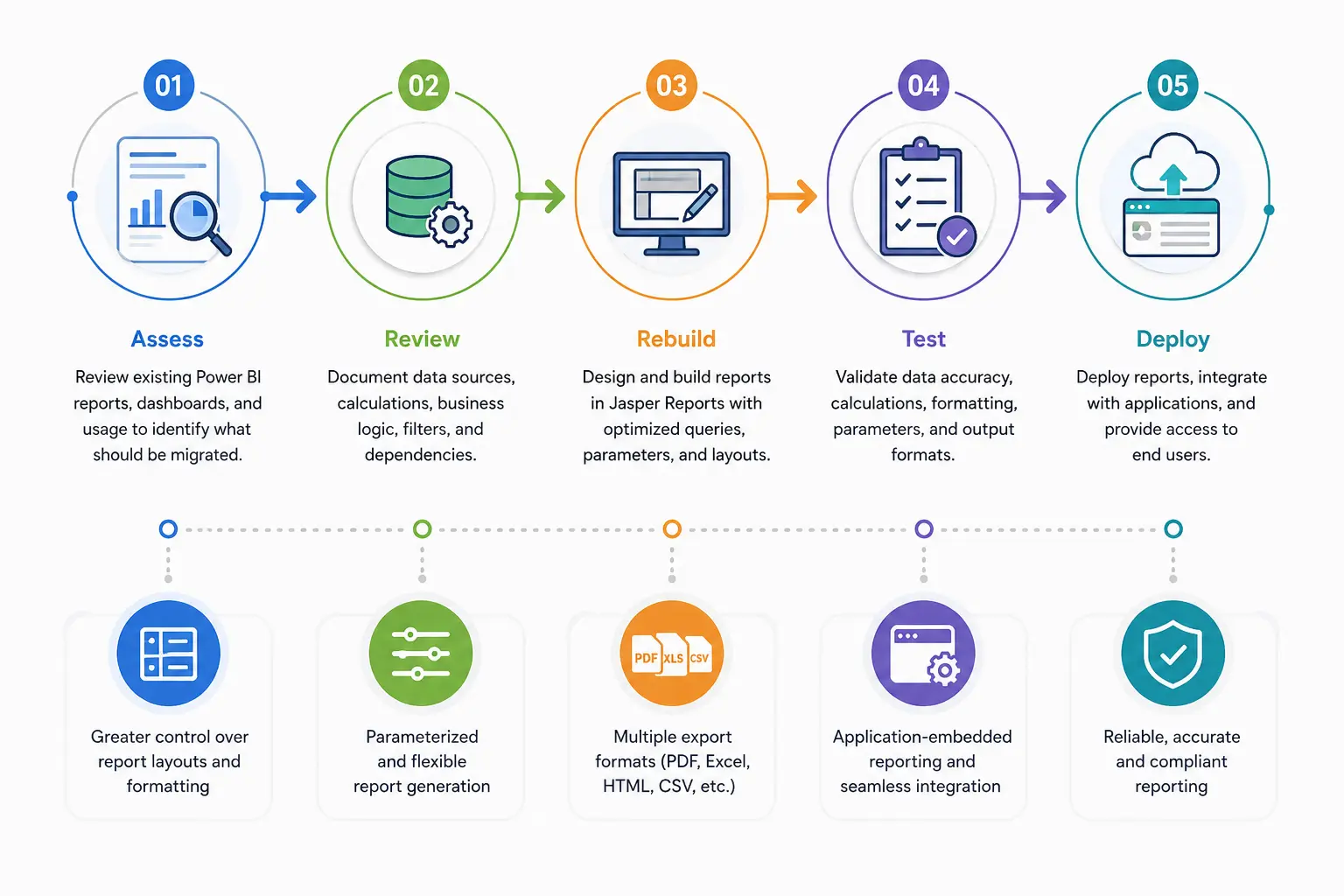
1. Assess Existing Reports
Begin by reviewing existing Power BI dashboards and reports. Identify which reports are actively used, which contain critical business information, and which may no longer be necessary.
This assessment helps prioritize migration work and prevents time being spent on outdated or redundant reports.
2. Review Data Sources and Logic
Power BI reports may depend on multiple databases, datasets, calculated fields, filters, and business rules. These dependencies need to be documented before the transition.
When organizations Migrate power BI to jasper reports, existing calculations and data relationships may need to be recreated using Jasper Reports and the underlying data source.
3. Rebuild and Customize Reports
Jasper Reports requires reports to be designed according to its own reporting structure. Existing Power BI layouts should therefore be reviewed rather than copied without modification.
This stage can include rebuilding queries, designing report templates, configuring parameters, adding calculations, and setting export formats.
4. Test Before Deployment
Each migrated report should be tested against the original version. Data accuracy, calculations, formatting, filters, parameters, and output files should all be checked before users begin relying on the new reports.
What reporting capabilities can be enhanced through Power BI to Jasper Reports migration?
Several reporting areas can benefit from the transition:
Pixel-perfect reporting: Jasper Reports provides detailed control over positioning, formatting, spacing, and report structure.
Application integration: Reports can be embedded into business applications, allowing users to access reporting functionality within existing workflows.
Flexible output generation: Reports can be generated in formats such as PDF, Excel, HTML, and CSV.
Parameterized reporting: Users can generate reports according to selected criteria such as dates, departments, customers, products, or regions.
Customized layouts: Businesses can design reports around specific operational, financial, regulatory, or management requirements.
These capabilities can be particularly useful when organizations need structured reports rather than primarily interactive dashboards.
Challenges to Consider
Although the transition can provide several advantages, it also requires careful planning. Some existing reports may contain complex calculations, data relationships, custom transformations, or visual elements that require redevelopment.
Common challenges include:
Complex Business Logic
Existing calculations and measures may need to be translated into a different reporting structure. This requires a detailed understanding of how the original reports work.
Data Source Dependencies
Reports may rely on multiple databases, APIs, or other data sources. These dependencies need to be mapped correctly to the new environment.
Large Report Volumes
Organizations with hundreds of reports may find it difficult to migrate everything simultaneously. Prioritization can help reduce project complexity.
User Adoption
Users familiar with existing dashboards and workflows may require time to adapt to new reporting formats and processes.
Performance Optimization
Complex queries, large datasets, and poorly optimized report designs can affect report generation times. Performance should therefore be considered throughout development and testing.
How can organizations plan a successful Power BI to Jasper Reports migration?
A clear roadmap can help organizations manage the transition efficiently. The planning process should include the following steps:
1. Define objectives: Identify why the organization is considering the transition and what it expects to achieve.
2. Create a report inventory: Document reports, users, data sources, calculations, and dependencies.
3. Prioritize reports: Begin with business-critical and frequently used reports.
4. Map data and logic: Determine how existing data structures and business rules will work in the new environment.
5. Create migration phases: Divide the project into manageable stages rather than moving everything at once.
6. Establish testing criteria: Define how data accuracy, functionality, formatting, and performance will be validated.
7. Prepare users: Communicate changes and provide the necessary training or documentation.
8. Monitor after deployment: Review performance and user feedback after reports go live.
This approach makes Power BI to Jasper Migration more manageable and gives teams an opportunity to identify issues before they affect the wider reporting environment.
Benefits of the Migration
A well-planned Power BI to Jasper Migration can provide several practical benefits:
• Better report customization: greater control over layouts, formatting, and report structure.
• Multiple output formats: Generate reports in formats suited to different business and user requirements.
• Application integration: Embed reporting capabilities directly into business applications.
• Structured reporting: Support recurring operational and business reports with consistent templates.
• Improved report management: Create standardized reporting formats that can be reused across different requirements.
These benefits are especially relevant for organizations where reporting needs have moved beyond interactive dashboards and require more structured document generation.
Why Choose OdiTek?
Migrating a reporting environment requires more than rebuilding report layouts. It involves understanding existing data sources, business logic, integrations, and reporting workflows.
OdiTek can support organizations throughout the migration process; from assessing existing reports and identifying dependencies to developing, testing, and deploying Jasper Reports. The focus is on maintaining reporting accuracy while creating a reporting environment aligned with current business requirements.
Final Thoughts
Migrating reporting platforms is not about choosing one tool over another; it is about choosing what works best for the reports your business actually relies on. If structured layouts, customized outputs, and application-based reporting have become increasingly important, Jasper Reports can offer a different way to approach those requirements.
The success of Power BI to Jasper Migration ultimately depends on how well the existing reporting environment is understood before the transition begins. By identifying what needs to change, preserving what already works, and addressing challenges early, organizations can make the move with a clearer purpose and a reporting setup that fits their needs better.
To learn more about how Jasper reporting solutions can support your business, visit the Jasper Report Skill Page.
Contact us today to streamline your reporting processes and build a more insight-driven data environment.
Frequently Asked questions (FAQs)
1. What factors determine whether Jasper Reports is a good fit for an existing reporting environment?
The decision depends on reporting requirements such as layout control, report complexity, output formats, application integration, data sources, and the level of customization required.
2. Can Jasper Reports handle large datasets?
Yes. Jasper Reports can work with large datasets when the underlying queries, database structure, and report design are properly optimized.
3. Can Jasper Reports be embedded into business applications?
Yes. Jasper Reports can be integrated into applications, allowing users to generate and access reports directly within existing business systems.
4. How long does a reporting migration take?
The timeline depends on factors such as the number of reports, data sources, report complexity, integrations, and testing requirements.
5. What happens to existing Power BI dashboards after migration?
Existing dashboards should be reviewed individually. Some may be recreated as Jasper Reports, while others may be retained in Power BI if their interactive analytics capabilities are still required.